Showing posts with label digital painting. Show all posts

Thursday, February 09, 2012

Get Ready...


Howdy folks!
Quick digital painting done this afternoon.
Thanks for stopping by.

Tuesday, January 24, 2012

60th Birthday


Howdy!
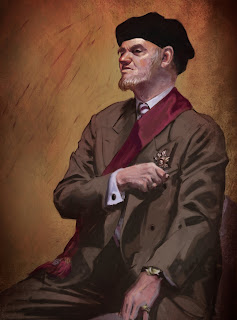
This is a digital painting/collage I did for my father-in-law's 60th Birthday Celebration.
Thanks for stopping by.

Wednesday, January 26, 2011

Playing with Color


Howdy folks!
In this study, I tried to capture the mood of the pose as well as the likeness of the model.
...and I forced myself to do it entirely with Painter.
It turned out good, I think, even after a long hiatus from painting digitally.
Hope you'll enjoy it.
Thanks for stopping by.

Tuesday, June 08, 2010

Oh, please. Not Another Step-by-step!!!


Howdy partners!
Things are pretty busy around here, it's really hard to find some time to update the blog. I'd like to take this time to thank you for your patience.
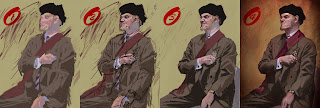
Going back to the basics. It's a digital painting from a photograph (a printed photograph, not a digital file, which made it a bit harder to paint).
Started with the big shapes, trying to capture the colors.
Then on to the drawing.
Then fixing the painting according to the drawing.
And finally, introducing some texture, adjusting the colors and making the background a bit more interesting.
90% done with Painter, 10% Photoshop.
Thanks for stopping by.

Thursday, October 08, 2009

Self-Portrait


Hello folks!
This digital sketch started out as a simple montage - I wanted to make a unique self-portrait/profile picture - and it evolved towards a quick illustration. The montage itself didn't turn out very good, then I thought "Hey, I haven't painted anything for a while..." so I decided to use the crude montage as a reference for this quick digital sketch.
Hope you guys enjoy it. It was fun painting it.
Later folks!

Monday, February 02, 2009

Digital Study 2


Hello everybody!
This is another quick digital study I painted.
Developed with Photoshop and Painter as well.
Thanks for stopping by.

Thursday, October 02, 2008

Small Concept Study


Hello folks!
This is a quick demonstration I did for my students.
It's a small concept design piece.
I started off with different abstract shapes in several different layers, then I adjusted the blending modes, kinda merged them together (in Photoshop), and finally added the details and adjusted the colors.
Hope you guys enjoy it.
I think it turned out ok.
One of my students, Mauro Salgado, did an amazing job today in class (way better than mine, by the way). In order to check his work, just click on his name (highlighted above) or check the links section.
Way to go dude! I'm proud of you.
Thanks fellas for stopping by.